some of the useful tool which are available in Codeplex.
Ribbon Editor Tool : To customize Ribbon easily http://ribboneditor.codeplex.com/
Site Map Editor Tool: For easy sitemap editing http://sitemapeditor.codeplex.com/
JavaScript Resource Manager: http://jswebresourcemanager.codeplex.com/
Odata Designer Tool : http://crm2011odatatool.codeplex.com/
CRM 4 - CRM 2011 javascript converter: http://crm2011scriptconvert.codeplex.com/
MetaData Browser : http://crm2011metabrowser.codeplex.com/
Showing posts with label CRM 2011. Show all posts
Showing posts with label CRM 2011. Show all posts
Wednesday, August 3, 2011


Friday, March 4, 2011
Step by Step: Upgrading CRM 2011 RC – CRM 2011 RTM
- Uninstall the RC
Uninstall CRM 2011 RC using add or remove programs

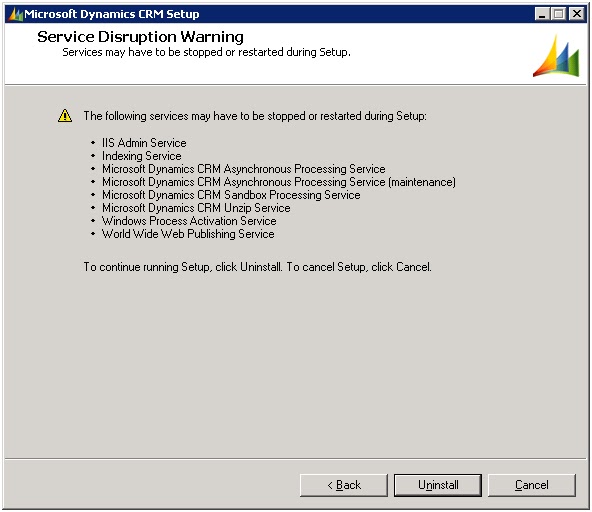


Uninstallation of CRM 2011 RC has been finished.
Now run the CRM 2011 RTM installation wizard


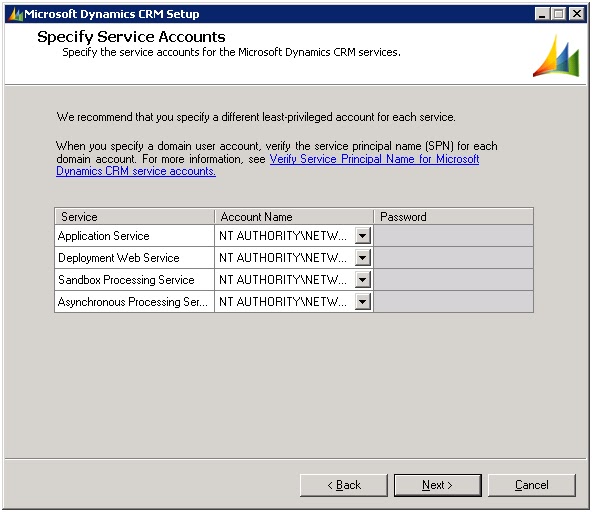


CRM 2011 RTM installation finished.

Now download the RTM Patch (KB 2461082) Click!


Installing Reporting server Extension patch


4.Run the SQL Script from KB 2461082 against any Microsoft Dynamics CRM 4.0 organizations that were upgraded to Microsoft Dynamics CRM 2011 while the server was using RC bits.

here is the SQL Script
delete from UserQueryBase where QueryType = 256 and ReturnedTypeCode = 2 and (FetchXml is null or LEN(FetchXml) = 0)


insert into UserQueryBase


(UserQueryId, Name, Description, ReturnedTypeCode, QueryType, FetchXml,


ColumnSetXml, LayoutXml, OwningBusinessUnit, ModifiedBy, ModifiedOn, CreatedBy, CreatedOn,


StatusCode, StateCode, OwnerId)


Select NEWID(), Name, Description, 2, 256, FetchXml,


ColumnSetXml, LayoutXml, OwningBusinessUnit, ModifiedBy, getutcdate(), CreatedBy, getutcdate(),


StatusCode, StateCode, OwnerId from UserQueryBase where QueryType = 16 and ReturnedTypeCode = 2 and ParentQueryId is null


GoWednesday, February 23, 2011
Increase the Maximum Records exported to Excel in CRM 2011
some times you needs to export more than 10000 records from CRM to reimport it back into other environment. But default CRM supports upto 10000 records while exporting crm records into Excel.
Follow the steps below to make the change at the database level in CRM 2011/4.0 to extend the limitation.
- Open SQL Mangement Studio
- Use the <organization>_MSCRM database
- Open the OrganizationBase table
- Locate the column – MaxRecordsForExportToExcel
- Change the value to the new value, to which extent you wants to increase.
Thats it, now you can export data to your wish. No limitation... :)
"My best friend is the one who brings out the best in me."
- Henry Ford
- Henry Ford
Monday, February 21, 2011
From Ribbon button calling On demand workflow for selected records of grid in CRM2011
From Ribbon button calling On demand workflow for selected records of grid in CRM2011
Add the following code in the customization.xml file while customizing the ribbon button
<CommandDefinitions>
<CommandDefinition Id="Cmd_JavaScript2">
<EnableRules>
<EnableRule Id="Mscrm.Enabled" />
</EnableRules>
<DisplayRules />
<Actions>
<JavaScriptFunction Library="$webresource:new_callworkflow" FunctionName="myworkflow">
// Add this line to get the list of selected records guid's
<CrmParameter Value="SelectedControlSelectedItemReferences" />
</JavaScriptFunction>
</Actions>
</CommandDefinition>
</CommandDefinitions>
Add this java script in the web resource "new_callworkflow"
function Myfunction(SelectedControlSelectedItemReferences) {
var allItems = new Array
var allItems = SelectedControlSelectedItemReferences
var iTotal = allItems.length;
if (iTotal > 0) {
for (var i = 0; i < iTotal; i++) {
// alert(allItems[i].Id)
callworkfow(allItems[i].Id);
}
alert("Success");
}
else
alert("Please select any record to perform required action");
}
function callworkfow(id)
{
try
{
var guid;
if(id == null)
{
guid =Xrm.Page.data.entity.getId();
}
else
guid = id;
// assign workflow guid
var WorkflowId ="0ACBCECD-DE6C-4E86-A767-0B1EE34B03D2";
var xml = "" +
"<?xml version=\"1.0\" encoding=\"utf-8\"?>" +
"<soap:Envelope xmlns:soap=\"http://schemas.xmlsoap.org/soap/envelope/\" xmlns:xsi=\"http://www.w3.org/2001/XMLSchema-instance\" xmlns:xsd=\"http://www.w3.org/2001/XMLSchema\">" +
Xrm.Page.context.getAuthenticationHeader() +
"<soap:Body>" +
"<Execute xmlns=\"http://schemas.microsoft.com/crm/2007/WebServices\">" +
"<Request xsi:type=\"ExecuteWorkflowRequest\">" +
"<EntityId>" + guid + "</EntityId>" +
"<WorkflowId>" + WorkflowId + "</WorkflowId>" + //WorkflowId = guid of the workflow
"</Request>" +
"</Execute>" +
"</soap:Body>" +
"</soap:Envelope>";
var xmlHttpRequest = new ActiveXObject("Msxml2.XMLHTTP");
xmlHttpRequest.Open("POST", "/mscrmservices/2007/CrmService.asmx", false);
xmlHttpRequest.setRequestHeader("SOAPAction", "http://schemas.microsoft.com/crm/2007/WebServices/Execute");
xmlHttpRequest.setRequestHeader("Content-Type", "text/xml; charset=utf-8");
xmlHttpRequest.setRequestHeader("Content-Length", xml.length);
xmlHttpRequest.send(xml);
var resultXml = xmlHttpRequest.responseXML;
if(id == null)
alert("Success");
return (resultXml.xml);
}
catch(e)
{
alert("Failed to Execute");
}
}
Add the following code in the customization.xml file while customizing the ribbon button
<CommandDefinitions>
<CommandDefinition Id="Cmd_JavaScript2">
<EnableRules>
<EnableRule Id="Mscrm.Enabled" />
</EnableRules>
<DisplayRules />
<Actions>
<JavaScriptFunction Library="$webresource:new_callworkflow" FunctionName="myworkflow">
// Add this line to get the list of selected records guid's
<CrmParameter Value="SelectedControlSelectedItemReferences" />
</JavaScriptFunction>
</Actions>
</CommandDefinition>
</CommandDefinitions>
Add this java script in the web resource "new_callworkflow"
function Myfunction(SelectedControlSelectedItemReferences) {
var allItems = new Array
var allItems = SelectedControlSelectedItemReferences
var iTotal = allItems.length;
if (iTotal > 0) {
for (var i = 0; i < iTotal; i++) {
// alert(allItems[i].Id)
callworkfow(allItems[i].Id);
}
alert("Success");
}
else
alert("Please select any record to perform required action");
}
function callworkfow(id)
{
try
{
var guid;
if(id == null)
{
guid =Xrm.Page.data.entity.getId();
}
else
guid = id;
// assign workflow guid
var WorkflowId ="0ACBCECD-DE6C-4E86-A767-0B1EE34B03D2";
var xml = "" +
"<?xml version=\"1.0\" encoding=\"utf-8\"?>" +
"<soap:Envelope xmlns:soap=\"http://schemas.xmlsoap.org/soap/envelope/\" xmlns:xsi=\"http://www.w3.org/2001/XMLSchema-instance\" xmlns:xsd=\"http://www.w3.org/2001/XMLSchema\">" +
Xrm.Page.context.getAuthenticationHeader() +
"<soap:Body>" +
"<Execute xmlns=\"http://schemas.microsoft.com/crm/2007/WebServices\">" +
"<Request xsi:type=\"ExecuteWorkflowRequest\">" +
"<EntityId>" + guid + "</EntityId>" +
"<WorkflowId>" + WorkflowId + "</WorkflowId>" + //WorkflowId = guid of the workflow
"</Request>" +
"</Execute>" +
"</soap:Body>" +
"</soap:Envelope>";
var xmlHttpRequest = new ActiveXObject("Msxml2.XMLHTTP");
xmlHttpRequest.Open("POST", "/mscrmservices/2007/CrmService.asmx", false);
xmlHttpRequest.setRequestHeader("SOAPAction", "http://schemas.microsoft.com/crm/2007/WebServices/Execute");
xmlHttpRequest.setRequestHeader("Content-Type", "text/xml; charset=utf-8");
xmlHttpRequest.setRequestHeader("Content-Length", xml.length);
xmlHttpRequest.send(xml);
var resultXml = xmlHttpRequest.responseXML;
if(id == null)
alert("Success");
return (resultXml.xml);
}
catch(e)
{
alert("Failed to Execute");
}
}
Subscribe to:
Posts (Atom)